Example of how to create a .net core cmdlet with Visual Studio#5096
Example of how to create a .net core cmdlet with Visual Studio#5096daxian-dbw merged 28 commits intoPowerShell:masterfrom
Conversation
|
Review shows urls instead of images; |
|
|
||
| This demonstrates how to build your own C# cmdlet for PowerShell Core with Visual Studio. | ||
|
|
||
| We will use free Visual Studio Community 2017 that can be downloaded from [https://www.visualstudio.com/downloads](https://www.visualstudio.com/downloads) |
There was a problem hiding this comment.
You can just make 'Visual Studio Community 2017' the link instead of making the hyperlink text the hyperlink
| 1. When installing Visual Studio 2017 select `.NET Core cross-platform development` under `Other Toolsets` | ||
| 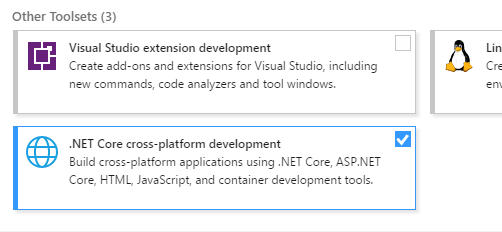 | ||
|
|
||
| 2. Create new C# project `SendGreeting` of type `Class Library (.NET Core)` |
There was a problem hiding this comment.
I believe the markdown rules are to use 1. for each item in the numbered list and the renderer takes care of incrementing
There was a problem hiding this comment.
I've checked - both syntaxes can be used.
Tried to use '1.' for all items, but got across formatting issues and number list getting broken after code section. Not worth the time spent on changing this.
| We will use free Visual Studio Community 2017 that can be downloaded from [https://www.visualstudio.com/downloads](https://www.visualstudio.com/downloads) | ||
|
|
||
| 1. When installing Visual Studio 2017 select `.NET Core cross-platform development` under `Other Toolsets` | ||
|  |
There was a problem hiding this comment.
These images should have proper file names and checked into this folder so it's self contained
There was a problem hiding this comment.
Ironically, I was specifically trying to avoid that. :)
Updated.
| 5. Build solution (F6); The `Output` window will print the location of generated cmdlet DLL: | ||
|  | ||
|
|
||
| 6. Start PowerShell Core, run `Import-Module` on DLL path from previous step and run cmdlet: |
There was a problem hiding this comment.
You should show that this cmdlet should also work with Windows PowerShell v3+ (although I believe we have a problem right now with .Net Std shims now being available for .Net 4.6.x)
There was a problem hiding this comment.
Like you said, right now its not working.
There was a problem hiding this comment.
Update: it actually does work with .Net 4.7.1 on WindowsPS on Win10, but some instructions have to be different for cmdlet built for PowerShell Standard.
| In `Solution Explorer` right click on project `Dependencies` and select `Manage NuGet Packages...` | ||
| In the top-right corner of the package manager click on the small `Settings` sprocket icon that is to the right from `Package source` dropdown. | ||
| By default, there will be only `nuget.org` package source in `Available package sources` list. | ||
| Add another package source with name `powershell-core` and source `https://powershell.myget.org/F/powershell-core/api/v3/index.json` |
There was a problem hiding this comment.
For issue #4809, you need to use the package PowerShellStandard.Library instead.
There was a problem hiding this comment.
Already updated. :)
Added a separate list of steps for PowerShell Standard.
|
Please add this file to the The |
| @@ -0,0 +1,118 @@ | |||
| # Building a C# Cmdlet for PowerShell Core | |||
There was a problem hiding this comment.
It's better to say "with Visual Studio 2017", to differentiate from #5117
| @@ -0,0 +1,118 @@ | |||
| # Building a C# Cmdlet for PowerShell Core | |||
|
|
|||
| This demonstrates how to build your own C# cmdlet for PowerShell Core with Visual Studio. | |||
There was a problem hiding this comment.
Please don't use README.md, instead use a file name like visual-studio-simple-example.md.
|
|
||
| This demonstrates how to build your own C# cmdlet for PowerShell Core with Visual Studio. | ||
|
|
||
| We will use free [Visual Studio Community 2017](https://www.visualstudio.com/downloads). |
There was a problem hiding this comment.
use free
Maybe use the free?
|  | ||
|
|
||
|
|
||
| # Building a C# Cmdlet for PowerShell Standard 3.0 |
There was a problem hiding this comment.
You cannot have 2 top-level titles in one markdown file. The markdown test will report an error on this. So you need to re-organize the hierarchy of the content.
There was a problem hiding this comment.
changed by adding 1 master TOC-type section in the start of the doc with links to 2 subsections.
|
Added this doc to markdown.tests.ps1; tests pass. |
|
@SteveL-MSFT @daxian-dbw Feedback addressed; please review. |
| By default, there will be only `nuget.org` package source in `Available package sources` list. | ||
| Add another package source with name `powershell-core` and source `https://powershell.myget.org/F/powershell-core/api/v3/index.json` | ||
|  | ||
| In the package manager select new `powershell-core` in `Package source` dropdown, select `Browse` tab, type in `System.Management.Automation` in the search and select `Include prerelease`. |
There was a problem hiding this comment.
This line is rendered to the same line of the image. Should be in a new line.
| 1. Create new C# project `SendGreetingStd` of type `Class Library (.NET Standard)` | ||
|  | ||
| On project properties verify that `Target framework` is `.NET Standard 2.0`: | ||
|  |
There was a problem hiding this comment.
This image is rendered to the same line as the above text. Should be in new line.
|  | ||
|
|
||
| 1. Now cmdlet can be run on systems supported by PowerShell Standard; for example: | ||
| On PowerShell Core on Windows: |
There was a problem hiding this comment.
Is this line supposed to be on a newline? It's rendered in the same line as above text.
|
|
||
| ## Building a C# Cmdlet for PowerShell Core with Visual Studio | ||
|
|
||
| This demonstrates how to build your own C# cmdlet for PowerShell Core with Visual Studio. |
There was a problem hiding this comment.
I think it's worth explicitly saying something like:
Targeting for PowerShell Core means that the cmdlet may not work against Windows PowerShell if you take dependencies on new APIs introduced in PowerShell Core.
|
|
||
| ## Building a C# Cmdlet for PowerShell Standard 3.0 with Visual Studio | ||
|
|
||
| Steps below show how to build your own C# cmdlet for PowerShell Standard 3.0 with Visual Studio. |
There was a problem hiding this comment.
I think it's worth adding explicitly:
Targeting PowerShell Standard 3.0 means that the same module will work against PowerShell Core as well as Windows PowerShell v3 and newer, however, you are limited to a subset of the available PowerShell APIs.
|
@SteveL-MSFT @daxian-dbw PR updated, please review again. Thanks. |
Adding PowerShell/docs/cmdlet-example/README.md that describes how to create a .net core cmdlet with Visual Studio.
Fix #3081
Fix #4809